
Freelance PrestaShop Maintenance: Everything You Need to Know Before Outsourcing
Learn what PrestaShop maintenance includes, the risks of an unmaintained store, and how to choose the right freelance specialist.

Article summary
PrestaShop maintenance covers updates (core, modules, theme), security, backups, and performance monitoring. Without regular maintenance, your store becomes vulnerable to hacks, loses SEO visibility, and risks losing sales. A specialized freelance developer is often more responsive and cost-effective than an agency for this type of work. To outsource your maintenance now, visit the PrestaShop service page on uzzle.fr.
What is PrestaShop maintenance?
PrestaShop maintenance refers to all the regular technical operations required to keep your online store secure, fast, and fully functional. It is not optional: it is the basic requirement for selling online without interruption.
Here are the three main pillars.
Updates (core, modules, theme)
PrestaShop regularly releases new versions. In 2025, PrestaShop 9.0 was released with a migration to Symfony 6.4 and PHP 8.1+. In early 2026, version 8.2.4 fixed a security vulnerability related to authentication. These updates do not install themselves automatically.
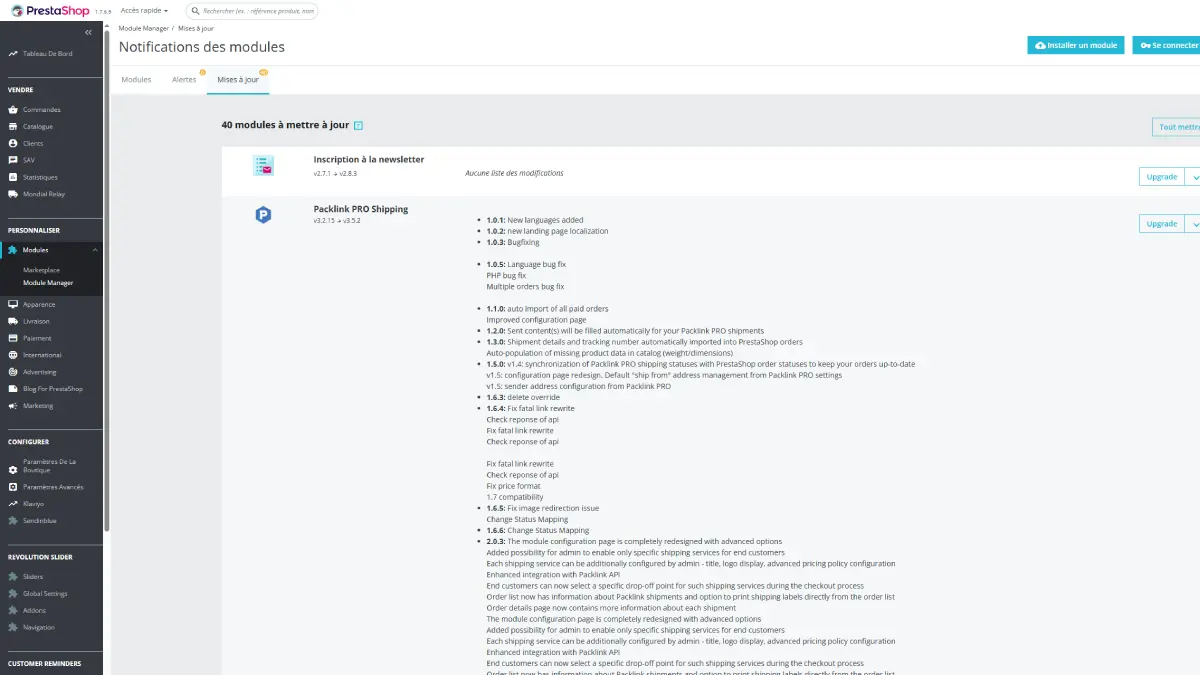
There are two types of updates:
- Minor updates (e.g. 8.1.4 → 8.1.5): bug fixes and security patches, usually quick and safe to apply.
- Major updates (e.g. 8.x → 9.x): structural changes requiring compatibility testing for every module and theme.
The golden rule: always test updates on a staging environment before deploying to production. An experienced freelancer will systematically follow this process.
Security and backups
Most compromised PrestaShop stores in 2024–2025 were hacked through an unmaintained third-party module, not through the CMS core itself. An outdated contact form module or an abandoned SEO tool are the real entry points.
Security best practices include:
- Applying patches as soon as they are released
- Removing unused modules
- Changing the back-office URL (do not keep
/adminby default) - Enforcing HTTPS everywhere
- Performing daily backups (files + database) with external storage
An untested backup is worthless. A reliable freelancer regularly checks that restoration procedures actually work.
Performance monitoring
A slow website directly impacts revenue. Loading times affect conversions. Maintenance includes:
- Monitoring response times (TTFB, Core Web Vitals)
- Cleaning cache and database
- Monitoring server errors (500, 404)
- Checking PHP compatibility (hosting providers regularly migrate to PHP 8.x)
Why maintenance is essential for your store
The risks of an unmaintained store
A PrestaShop store without maintenance is a ticking time bomb. Modules become incompatible, vulnerabilities accumulate, and the cache fills with obsolete files.
Real example: a merchant had not updated anything for two years. Their hosting provider migrated to PHP 8.2, which was incompatible with their PrestaShop 1.7.6 store. Result: the shop went offline. Restoring the site cost more than two years of preventive maintenance.
The real risks include:
- Hacking: active campaigns target popular unpatched modules
- Customer data loss: SQL injection and XSS vulnerabilities
- Store downtime: PHP incompatibility, 500 errors
- GDPR fines: exposed customer data creates legal liability
Impact on SEO and conversions
PrestaShop maintenance directly affects SEO, and this is often underestimated.
One client lost 35% of their organic traffic in three months without understanding why. After analysis in Google Search Console: 400 pages were marked as “Excluded – Not Found”. A poorly managed category restructuring had created hundreds of dead links without 301 redirects. Google deindexed everything.
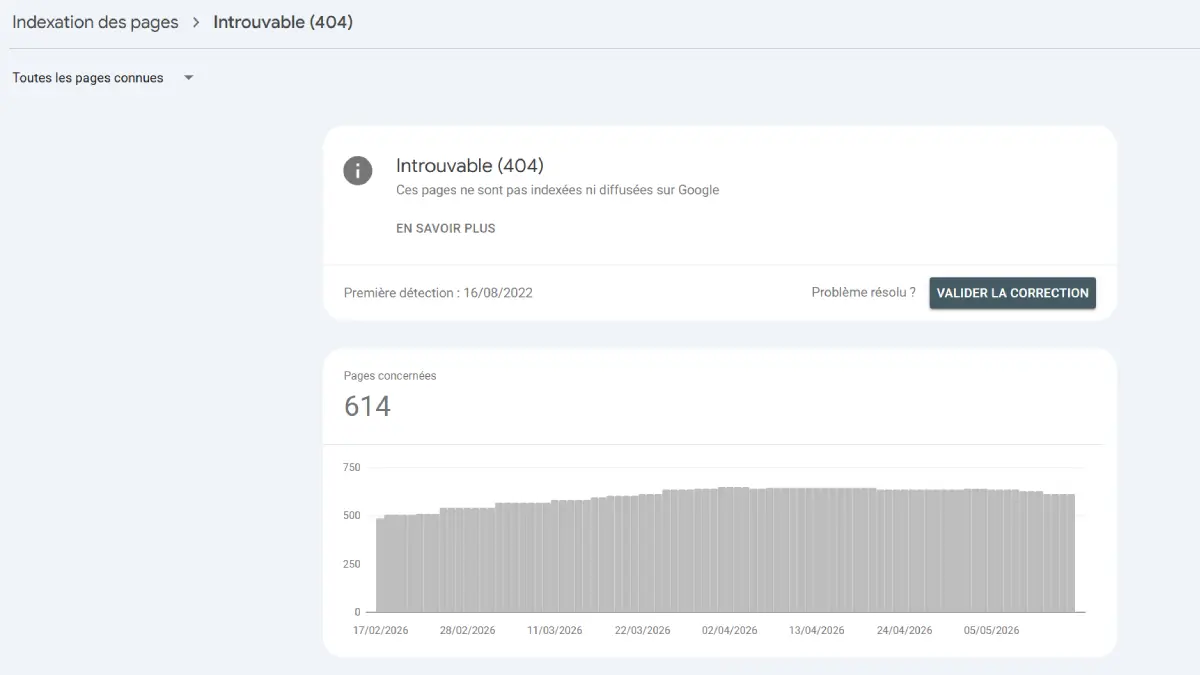
This type of issue takes one hour per month to identify with an attentive maintenance provider.
Other SEO elements to monitor:
- Updated XML sitemap
- Correct canonical tags
- Robots.txt not modified after updates
- Page speed performance (Google PageSpeed)
Freelancer vs agency: which one should you choose for PrestaShop maintenance?
Responsiveness and cost
Criteria | Freelancer | Agency |
|---|---|---|
Monthly pricing | ~€100–300/month | €300–800/month or more |
Responsiveness | Direct, often within 24h | Depends on internal scheduling |
Main contact | Single identified expert | Varies depending on teams |
Specialization | Often 100% PrestaShop-focused | Generalist or multi-CMS |
Commitment | Flexible (monthly possible) | Often yearly contracts |
The hourly rate of a PrestaShop freelancer in France usually ranges between €35 and €90/hour, depending on experience. Monthly maintenance packages typically range between €100 and €400 for a standard store.
A generalist agency usually charges more, with longer delays because your request passes through a project manager before reaching a developer.
Direct relationship with the expert
With a freelancer, you speak directly to the person working on your code. No ticket system, no repeated follow-ups, no endless meetings for every issue.
This becomes especially valuable during emergencies: store downtime, payment issues, hacking attempts. Every hour of downtime means lost revenue. If your store generates €500/day, two days offline can cost the equivalent of an entire year of maintenance.
A specialized PrestaShop freelancer also knows your store’s history. They do not need to rediscover everything from scratch during every intervention.
My opinion
For the vast majority of medium-sized PrestaShop stores, a direct relationship with a specialized freelancer is often more effective than an agency model. The reason is simple: you speak directly with the person who understands your store, works on the code, and knows the technical history of the website.
An agency can be relevant for very large projects that require several profiles working in parallel. But for 90% of PrestaShop maintenance needs — updates, security, bugs, module compatibility, performance, small improvements — a specialized freelancer generally offers better responsiveness, fewer intermediaries, more flexibility, and more controlled costs.
It is also a simpler day-to-day relationship. There is no need to go through several layers of approval to fix a concrete issue. When a store faces an error, a payment bug, or an incompatibility after an update, speed of analysis and intervention often matters more than a heavier structure.
What should a PrestaShop maintenance contract include?
Essential elements
A good PrestaShop maintenance contract goes far beyond occasional updates. Here is what should be clearly included:
- Scope of interventions: core, module, and theme updates: minor and/or major?
- Backups: frequency (ideally daily), storage location, tested restoration procedures
- Monitoring: uptime monitoring and anomaly alerts
- Response time: how quickly will the provider react in case of emergency?
- Activity reports: monthly summary of completed interventions
- Access rights: you must keep access to your hosting, back-office, and FTP
The most common commitment duration is 12 months, usually with automatic renewal. Some freelancers offer monthly plans without commitment: often a sign of confidence in the quality of their service.
Common pitfalls to avoid
Be careful with hidden exclusions. Some contracts include minor updates but charge extra for major updates without clearly stating it. Check this before signing.
Other common pitfalls:
- No defined SLA: without guaranteed response times, you depend entirely on the provider’s schedule. If your store crashes on Friday evening, you may wait until Monday.
- No external backup: a backup stored on the same server as the website is useless if the server fails.
- No client access: you should always retain ownership and access to your own store.
- Non-transferable hours: if you purchase a package of hours, make sure they remain valid for at least 12 months.
How to choose the right PrestaShop freelancer
Here are some concrete criteria to avoid making the wrong choice.
Check specialization. A freelancer doing PrestaShop, WordPress, and Shopify simultaneously is not truly a PrestaShop specialist. Look for someone whose core business is PrestaShop.
Ask for references. Preferably stores similar to yours in size, industry, and module complexity. A reliable provider will not hesitate to connect you with current clients.
Test responsiveness before signing. Send a technical question by email. The quality and speed of the reply will tell you more than a polished portfolio website.
Read the entire contract. Especially exclusion clauses, response times, and cancellation conditions.
Be cautious with extremely low prices. A €30/month package for an active store usually means either automated monitoring without real human intervention or a freelancer who will not sustain the service long-term.
Check transparency. A serious provider documents interventions and sends reports after every action. You should always know what was done, when, and why.
Looking for a freelancer to maintain your PrestaShop store?
I handle complete PrestaShop maintenance: secure updates, backups, performance monitoring, bug fixing, and responsive support.
Single point of contact. PrestaShop specialist. Guaranteed responsiveness.
→ Discover my PrestaShop services
My expert opinion
What is the first thing I check when I take over the maintenance of an existing PrestaShop store?
The first thing I do is a complete technical assessment. I check the PrestaShop version, the installed modules, the theme being used, whether a child theme is in place, the PHP version, the backups, and any visible errors in the logs.
The goal is simple: to determine whether the store is built on a healthy foundation or whether it already has invisible risks piling up. Before updating anything, I need to understand exactly what I am working on.
What is the most common hacking case I have encountered on poorly maintained stores?
The most common case I have encountered is credit card payment hijacking. The attacker injects a fake payment form that looks like a normal one, so the customer does not realize anything unusual is happening when entering their card details.
For the merchant, this is a particularly dangerous scenario: the store may sometimes continue to appear functional, while payments or sensitive data are being intercepted. This is typically the kind of issue that occurs on stores with unmaintained modules, old vulnerabilities, or modified files that are not being monitored.
How do I handle a major update, for example a move to PrestaShop 9, without taking the store offline?
I never perform a major update directly on the production store. I first work on a staging environment, meaning a copy of the website, to test the compatibility of PrestaShop, the theme, the modules, and any custom developments.
Once the tests have been validated, I give the client a demonstration, then prepare the final switch. Just before going live, I synchronize the latest important data — orders, customers, products, stock depending on the context — so the new version is up to date without unnecessarily interrupting the store’s activity.
FAQ
How much does PrestaShop maintenance cost with a freelancer?
For a monthly package, expect between €100 and €300 for a standard store. An experienced PrestaShop freelancer generally charges between €50 and €90/hour in France. Agencies usually charge more (€300 to €800/month) with slower response times.
What is the difference between corrective maintenance and evolutionary maintenance?
Corrective maintenance covers bugs, outages, and security patches: this is the minimum foundation. Evolutionary maintenance includes new features, module additions, and optimizations. A good contract clearly separates the two.
How often should PrestaShop be updated?
Minor updates (security patches) should be applied immediately after release. For major versions, a migration every 12 to 18 months is reasonable after testing in a staging environment. Never leave a store without updates for more than six months.
Can my PrestaShop store be hacked if I do not maintain it?
Yes. During 2024–2025, several critical vulnerabilities were massively exploited on unmaintained PrestaShop stores. Most compromises came from outdated third-party modules, not the PrestaShop core itself. A payment module left unpatched for a year is a real entry point for attackers.
What happens if I do not have a maintenance contract and my store crashes?
Without an active contract, you depend entirely on the provider’s availability. If their schedule is full, you may wait several days. Emergency interventions without a contract are also systematically billed at a higher rate than preventive monthly maintenance.
Can a freelancer handle maintenance for a complex PrestaShop store with custom modules?
Yes, provided they have access to the documentation of custom developments and a testing environment. In many cases, it is even more efficient than using an agency because a specialized freelancer understands PrestaShop architecture in depth and can intervene directly without intermediaries.
Should I choose a yearly or monthly contract?
Both have advantages. A yearly contract often comes with lower pricing and better visibility for the provider. A monthly contract without commitment gives you more flexibility. If you are working with a new freelancer, starting monthly is usually the safest approach.
Interactive mini-audit
Is your PrestaShop store properly maintained?
Answer these 3 questions to get a quick risk score.