
Migrating from PrestaShop 1.7 to 8: what you really need to know
Why migrate from PrestaShop 1.7 to 8 in 2026, what budget to expect, which risks to avoid and how to secure the launch.
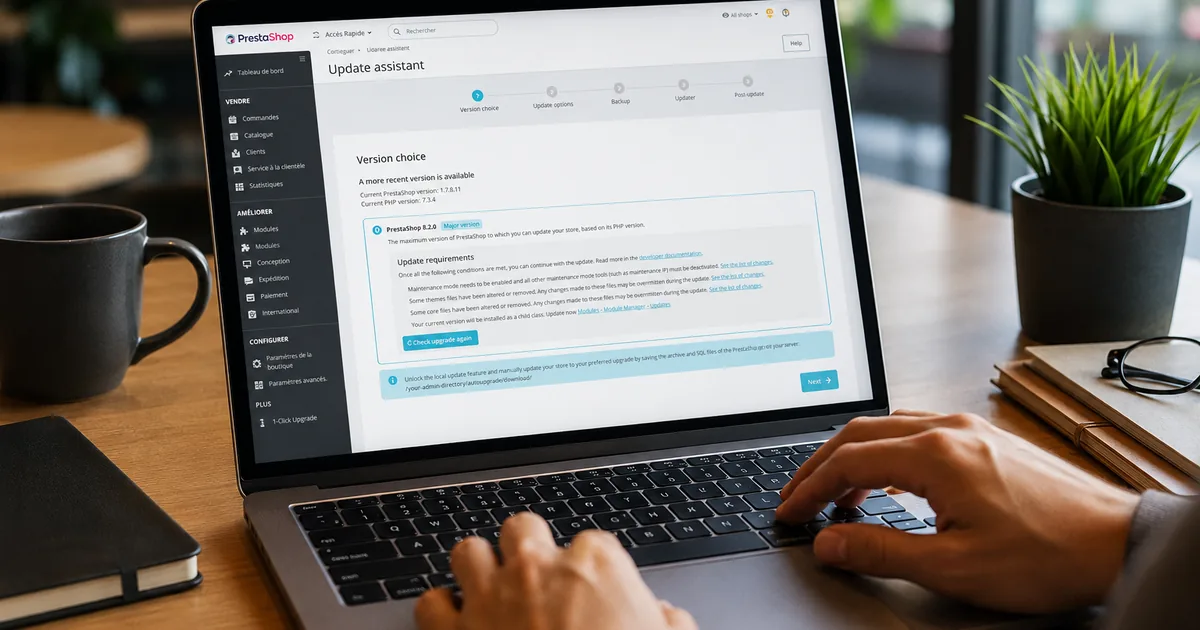
Article summary
- Why migrate: PrestaShop 1.7 has not received any security fixes since late 2024. Staying on it means exposing your store to unpatched vulnerabilities and risking a forced outage from your host because of PHP 8 incompatibility.
- How much it costs: between EUR 1,000 and EUR 5,000 with a freelancer for a standard store (500-3,000 products, 20-30 modules). More if custom ERP/CRM integrations are involved.
- How long it takes: plan for 3 to 9 weeks depending on the complexity of the work: audit, migration, testing, fixes and production launch.
PrestaShop 1.7: why staying on it has become risky
End of official support and security vulnerabilities
PrestaShop 1.7.8.11 is the last release of the 1.7 branch. It was released in March 2024. Since then, nothing.
The 1.7 branch no longer receives any security fixes. Every newly discovered vulnerability will remain open indefinitely. This is not theoretical: e-commerce stores are prime targets for payment data theft.
Since mid-2025, PrestaShop has even displayed a “your version is no longer maintained” message directly in the back office of all 1.7.x stores. The signal is clear.
And that is not all. Major module publishers: Stripe, PayPal, Alma, Mondial Relay, Colissimo, Chronopost: are gradually ending support for their PS 1.7 modules. PCI-DSS certified payment modules are no longer updated on this branch, which can become an issue during a compliance check.
PHP 8+ incompatibility: what it changes in practice
PrestaShop 1.7 runs on PHP 7.4 at most. PHP 7.4 has been “End of Life” since December 2022. That means this version has not received security patches for more than 3 years.
The practical issue is that hosting providers are gradually removing old PHP versions from their servers. If your host forces an upgrade to PHP 8.x, your PrestaShop 1.7 store can instantly display a 500 error or a blank page.
Why? The old Symfony versions used by PrestaShop 1.7 are not compatible with modern PHP 8.x functions. Functions commonly used by PrestaShop 1.7 and its modules were removed in PHP 8.x. When the site tries to call a function that no longer exists, the server stops immediately.
In 2026, PHP 8.3 is the version recommended by most hosting providers. Staying on PS 1.7 means running after an inevitable incompatibility.
PS 8 or PS 9: which version should you choose in 2026?
PS 8: stable, proven, recommended for most stores
PrestaShop 8 was released in October 2022. Since then, it has been stabilized and refined up to the 8.2.x branch. It is the most mature version for a production store.
Its module ecosystem is complete: almost all major modules (payment, logistics, marketing) offer a PS 8 compatible version. Migration from PS 1.7 to PS 8 is well documented, and experienced PrestaShop developers know this path.
PS 8 supports PHP 8.1 natively, which represents a 15 to 30% performance gain in request processing time compared with PHP 7.4.
My clear opinion: for a standard store in 2026: a catalog of a few hundred to a few thousand products, common modules, custom theme: PS 8 is the right choice. Pragmatic, secure, predictable.
PS 9: who is it relevant for?
PrestaShop 9 was officially released on June 6, 2025. It is a deep technical overhaul: Symfony 6.4 LTS, PHP 8.1 minimum (up to 8.4), new REST API, Hummingbird 2.0 theme.
Core Web Vitals performance is noticeably better than in PS 8. The architecture is more modern. But the module ecosystem is still consolidating.
PS 9 is relevant if:
- You are launching a new project from scratch
- You use the migration as an opportunity to fully redesign the store and its architecture
- You have modern integration needs (REST API, ERP, CRM)
- Your technical team is available to handle potential module adjustments
PS 9 is premature if:
- You have many specific or custom modules
- Your priority is speed and safety, not modernization
- Your budget is limited
My opinion: in 2026, I do not recommend PS 9 for most SMB clients, even though its technical foundations are better. On an existing store, the real topic is not only the PrestaShop core: it is module compatibility, theme compatibility, integrations and the budget required to stabilize everything. For an SMB that wants to secure the store without multiplying unknowns, PS 8 is generally the most pragmatic choice.
My field recommendation for 2026: if you are still on PS 1.7, move to PS 8 first to stabilize and secure the store. The PS 8 -> PS 9 transition will be more natural in 12 to 18 months, once the ecosystem is even more mature.
The 3 migration methods (and the one I recommend)
1-Click Upgrade: fast but risky
The Update Assistant module, formerly “1-Click Upgrade”, technical name: autoupgrade, is the official PrestaShop tool, available for free on GitHub. It automates a large part of the process.
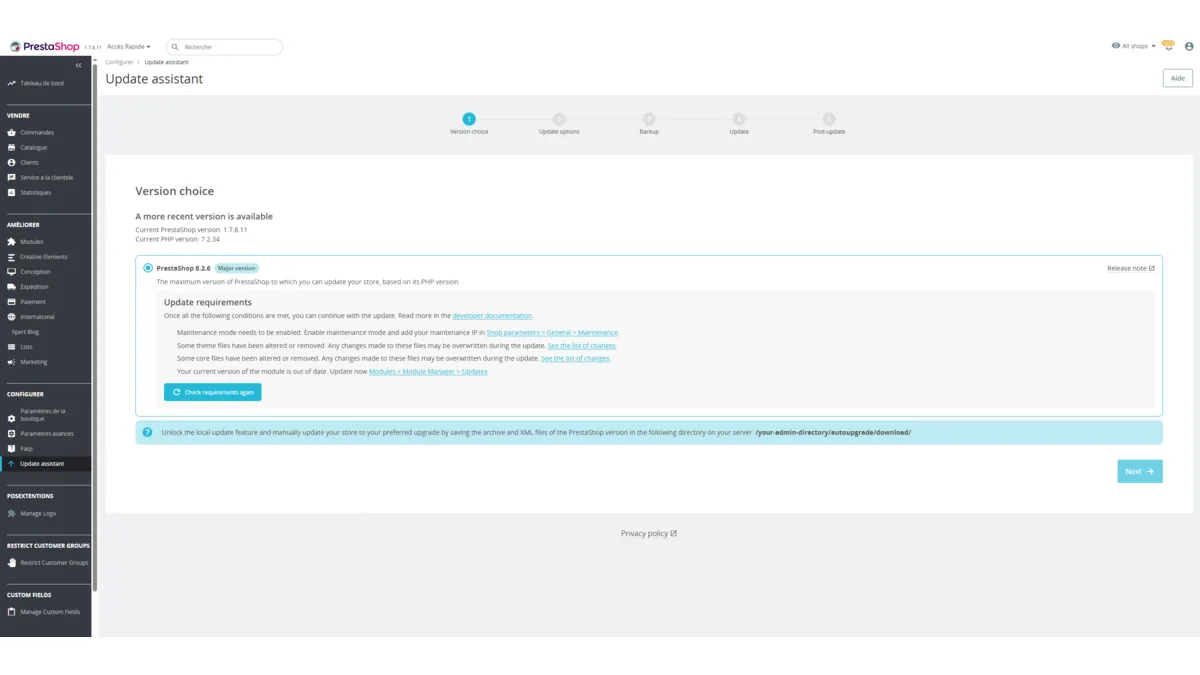
What it does: it downloads the new version, backs up your store, updates files and the database. It even checks the compatibility of installed modules with the target version before starting.
The problem: on a customized store with third-party modules, PHP overrides and a custom theme, this module can fail halfway through. The number of errors and crashes becomes significant as soon as the store moves away from a standard installation.
Use it if: your store is lightly customized, has few third-party modules and no complex overrides. Always on a pre-production environment, also called staging, first: this is a test copy of your store, separate from the live site seen by customers. Never directly in production.
Manual migration: the safe method
The first thing I do before any migration: a full audit of third-party modules: this is where 80% of the problems hide.
In real projects, there are two different cases.
If the store works well and relies on several important third-party modules, I usually start with a clone of the existing site. The goal is to work from the real store, with its theme, modules, orders and specific behavior, then attempt the upgrade on that pre-production copy. This shows exactly what breaks without touching the live store.
If the store already has technical issues, only a few critical third-party modules or poorly controlled customizations, starting again from a clean PrestaShop 8 installation can be healthier. In that case, the migration consists of:
- Installing a clean PS 8 instance on a pre-production environment
- Manually migrating the useful database and files
- Reinstalling and reconfiguring each PS 8 compatible third-party module
- Updating, adapting or replacing the theme depending on compatibility
- Testing thoroughly before switching production
This is the method I recommend for any store with customizations, critical modules or a large order history. It takes more time but leaves less room for bad surprises.
Important: this method is for developers who fully understand the PrestaShop architecture. One mistake in the replaced files can make the store inaccessible.
Migration Pro module: the compromise
Third-party modules such as MigrationPro or PS Migrator offer an intermediate approach: they migrate data (products, customers, orders) from a PS 1.7 instance to a fresh PS 8 instance through a connection between the two stores.
Advantages: more reliable than 1-Click Upgrade for data, less technical than a full manual migration.
Limits: the theme and modules still have to be handled separately. It is not a turnkey solution.
Budget and timeline: what to expect
Price ranges depending on store complexity
| Store profile | Freelancer budget | Agency budget |
|---|---|---|
| Simple (< 500 products, standard modules) | EUR 1,000 - 2,500 | EUR 3,000 - 6,000 |
| Standard (500-3,000 products, 20-30 modules) | EUR 2,500 - 5,000 | EUR 5,000 - 15,000 |
| Complex (ERP, custom modules, multistore) | EUR 5,000 - 15,000 | EUR 15,000 - 50,000 |
To these amounts, you should add updated module licences: expect between EUR 500 and EUR 3,000 depending on the number and criticality of modules to renew.
Some very old modules, or modules published by developers who have disappeared, will never be compatible with PS 8: you will need to find an equivalent or develop a custom replacement.
Realistic duration of a migration
3 to 9 weeks for a standard, well documented store. Not because the migration itself takes all that time: but because the audit, waiting for module compatibility, testing and fixes take time.
For a complex site with custom modules or ERP/CRM integrations: 3 to 6 months.
The timeline is often extended by client validations and availability of technical resources. Plan ahead.
The 5 risks you should not overlook
1. Incompatible modules
This is the number one risk. You need to list active third-party modules and check their PS 8 compatibility on the official marketplace or with the publishers. If you know how to do it, you can prepare that list yourself; otherwise, this is exactly the kind of audit I can handle for you. An incompatible payment or stock management module can block your migration for several weeks.
2. SEO and redirects
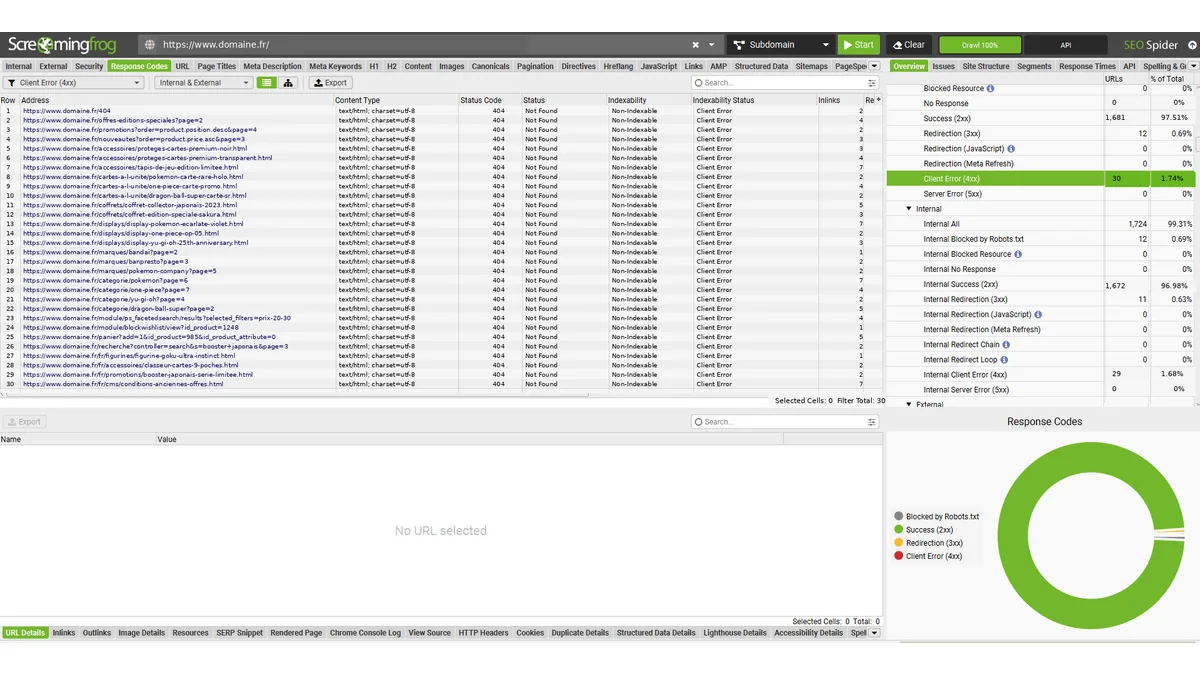
A poorly prepared migration can destroy years of SEO work in a few hours. The key point is simple: you need to make sure the existing URL structure will be preserved after the migration. If some URLs change anyway, 301 redirects must be prepared before going live. Some sites have seen traffic drop by 30 to 60% for several months after a botched migration.
3. Incompatible theme
Your PrestaShop 1.7 theme must be audited before migration. Many themes have a PS 8 compatible version that can be updated properly. If no compatible version exists, you will either need to adapt it or adopt a new compatible theme. This decision has a major impact on the overall budget.
4. Data integrity
Orders, customers, history: everything must be checked after migration. Test your backup restoration at least once before starting. An untested backup is not a backup.
5. ERP/CRM integrations
If your store is connected to an ERP, CRM or WMS through modules or web services, these integrations must be audited and tested separately. PrestaShop 9 replaces the old XML web services with a modern REST API: if you target PS 9, this is a separate project.
Pre-migration / post-migration checklist
Before: 8 points to validate
- Complete backup: files + database, stored on an external server
- Audit of all modules: PS 8 compatibility checked on the marketplace or with publishers
- Theme audit: compatibility or redesign plan defined
- Pre-production environment: clone of the current site or PS 8 instance installed on a test subdomain
- PHP version checked: hosting provider confirmed compatible with PHP 8.1+
- SEO crawl: export of all current URLs (with Screaming Frog or Sitebulb)
- Inventory of PHP overrides: list of all core customizations
- Rollback plan: documented procedure to revert if the migration fails
After: 6 points to check
- Complete checkout flow: from add to cart to order confirmation
- Payment modules operational: sandbox test + real test payment
- Transactional emails: order confirmation, shipping, password reset
- 301 redirects: check that old URLs redirect properly
- Google Search Console: submit the new sitemap, monitor crawl errors
- Performance: Lighthouse / GTmetrix test: scores should be at least equivalent to before
Why entrust your migration to a PrestaShop freelancer?
Migrating a PrestaShop store is a technical project in its own right. It is not a simple click. The question is not whether you need help, but who you trust to do it.
Freelancer vs agency: the real differences
A specialized PrestaShop freelancer means one single point of contact from start to finish. No file transfer between a salesperson, a project manager and a junior developer. You speak directly to the person doing the work.
Responsiveness is also a real advantage: if a problem appears in production on a Friday evening, you have someone to call: not a support ticket that will be handled on Monday morning.
On pricing, an experienced freelancer generally charges between EUR 400 and EUR 700 per day. A specialized agency is often twice as expensive, with structural costs included. For a standard migration, the difference can represent several thousand euros.
What you should check before entrusting your migration to a freelancer:
- Recent PrestaShop migration references (PS 1.7 -> PS 8 or PS 9)
- A working method with mandatory pre-production before production
- A commitment to SEO redirects and post-migration tests
- Availability for follow-up in the weeks after launch
My expert opinion
Which third-party module caused you the most trouble during a 1.7 -> 8 migration?
The modules that cause the most trouble are often ERP connectors or custom business modules. They may appear to work correctly on the storefront, but depend on old PrestaShop methods, overrides or poorly documented cron tasks.
How do you manage SEO risk on launch day?
I prepare a full crawl before migration, then run another crawl immediately after launch to check HTTP statuses, redirects, canonicals and strategic pages. The key point is to have the 301 redirects ready before going live, not after the first Search Console errors.
What is the first thing you check when a client says their 1.7 store “works fine”?
I first check the PHP version, critical modules and server logs. A store can look fine to customers while accumulating warnings, payment errors or silent incompatibilities that become blocking during migration.
FAQ
My PrestaShop 1.7 store works fine, why migrate now?
Because “it works” does not mean “it is secure”. PrestaShop 1.7 has not received any security fixes since late 2024. Every newly discovered vulnerability will remain open. And your host will eventually force a PHP upgrade that makes your store inaccessible. It is better to choose your schedule than to suffer an emergency.
Can I use the 1-Click Upgrade module without risk?
On a lightly customized store, yes: provided you do it on a pre-production environment first. On a store with third-party modules, overrides and a custom theme, the risk of failure halfway through is real. Manual migration is safer in that case.
Will I lose my Google rankings during the migration?
Not if the migration is properly prepared. SEO risks mainly come from changed URLs without 301 redirects and from excessive downtime. An SEO audit before migration + a complete redirect plan + a fast launch help preserve your rankings.
Should I migrate directly to PrestaShop 9 or go through PS 8 first?
For a production store with specific modules, I recommend moving to PS 8 first. It is safer, faster, and the PS 8 ecosystem is mature. The PS 8 -> PS 9 transition will be more natural in 12 to 18 months. If you are launching a new project, start directly on PS 9.
How long will my store be unavailable during the migration?
With a good method (migration on pre-production + DNS switch), the real downtime can be reduced to less than one hour. Some migrations are done with no visible downtime for customers. It all depends on the preparation beforehand.
Interactive calculator
Estimate the budget for a PrestaShop 1.7 to 8 migration
Enter your catalog size, number of active third-party modules and whether an ERP is connected to get a first estimate of budget and timeline.
Estimated freelance budget
Estimated timeline
Indicative estimate for a senior freelance intervention, excluding module licences. An audit is needed to confirm the real scope.
Discuss my PrestaShop migration